What is the issue you’re having?
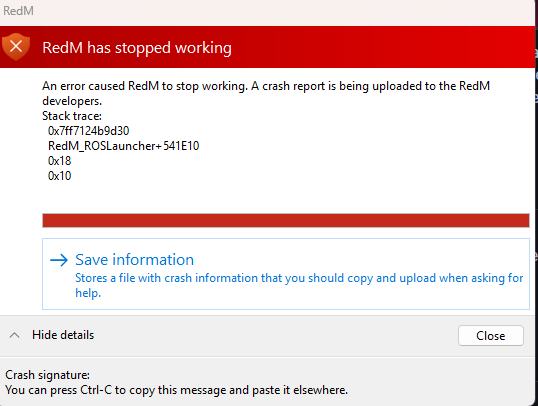
I’m experiencing a consistent RedM startup crash when launching with my Steam copy of Red Dead Redemption 2.
System:
Windows 11 Home, version 25H2, build 26200.9711
Steam version of RDR2
AMD Ryzen 5 7500F
AMD Radeon RX 7600
32 GB RAM
Symptoms:
RDR2 launches and plays normally through Steam.
RedM detects my Rockstar account and initially signs in successfully.
Rockstar briefly displays “Unable to launch RDR2.”
RedM crashes with RedM_ROSLauncher+541E10.
After the crash, Rockstar Launcher requires my full email and password again.
Rockstar remembers my credentials normally when RedM isn’t launched.
Relevant Rockstar Launcher errors:
No version info for …\RedM\RDR2.exe (0X000002)
WinVerifyTrust failed. hr = 80092003
Unable to verify game: …\RedM\RDR2.exe (code: 1)
Troubleshooting completed:
Confirmed correct RDR2 installation path in CitizenFX.ini.
Confirmed Steam launch options are empty.
Rebuilt RedM’s subprocess cache.
Checked Windows Security protection history.
Checked administrator and compatibility settings.
Tried launching RedM directly from AppData.
Verified that RedM.exe has a valid digital signature.
The crash remains unchanged.
Could someone help determine why Rockstar Launcher cannot verify RedM’s temporary RDR2 executable and why RedM_ROSLauncher crashes during startup?
Error screenshot(s)
Windows version
Windows 11 Home, version 25H2, build 26200.9711
System specifications
Steam version of RDR2
AMD Ryzen 5 7500F
AMD Radeon RX 7600
32 GB RAM
Antivirus software
Just the windows security