im assuming theres no way to make it the police vehicles for your own servers needs? would be really cool if the cruisers would be OPP or toronto police in our server
yes you can i have calgary cop cars on my server and RCMP as well just need to change the vanilla ones in your car folder to your livery for your city
1 Like
yea i am also having this issue. Seems like a great idea
Hella smart.
I am a complete noob to gtav servers so I’m just going to ask instead of googling in circles like I have been for the last 2 hours. Where do I add the
exports['sd-aipolice']:ApplyWantedLevel(--1 to 5)
code. Let’s use the example of qb-bankrobbery?
So far I have done everything in the installation instructions. Changed all the lines in every .lua file and then I assumed I take the files from the github and place the sd-aipolice folder in the same folder as all the qb-(insertjobnamehere) folders. But I can’t seem to wrap my head around where the export line goes even after staring at the QBCore documentation on exports. Any help would be greatly appreciated. It’s not my first time modding other online servers so just which file and inside of what code section and I should be good to go.
Thanks.
EDIT: So I sort of have it working for jewelry. I added it to when the player smashes the glass it gives them 2 stars but then every time they smash a glass it adds 2 more stars so I need to figure out how to make that only happen once. I did this in the qb-jewelery\client\main.lua but I think I might have to do it in the server side where the police get notified instead so it only happens once? Not sure.
edit2: it is in client, I just had to do it in the firstalarm section. I think I have it figured out now.
1 Like
would you mind
sharing your changes with me
Can someone how this should be added to work?
replace it with the one inside the lua file.
Having an issue… what would be the fix? (running QB-Core)
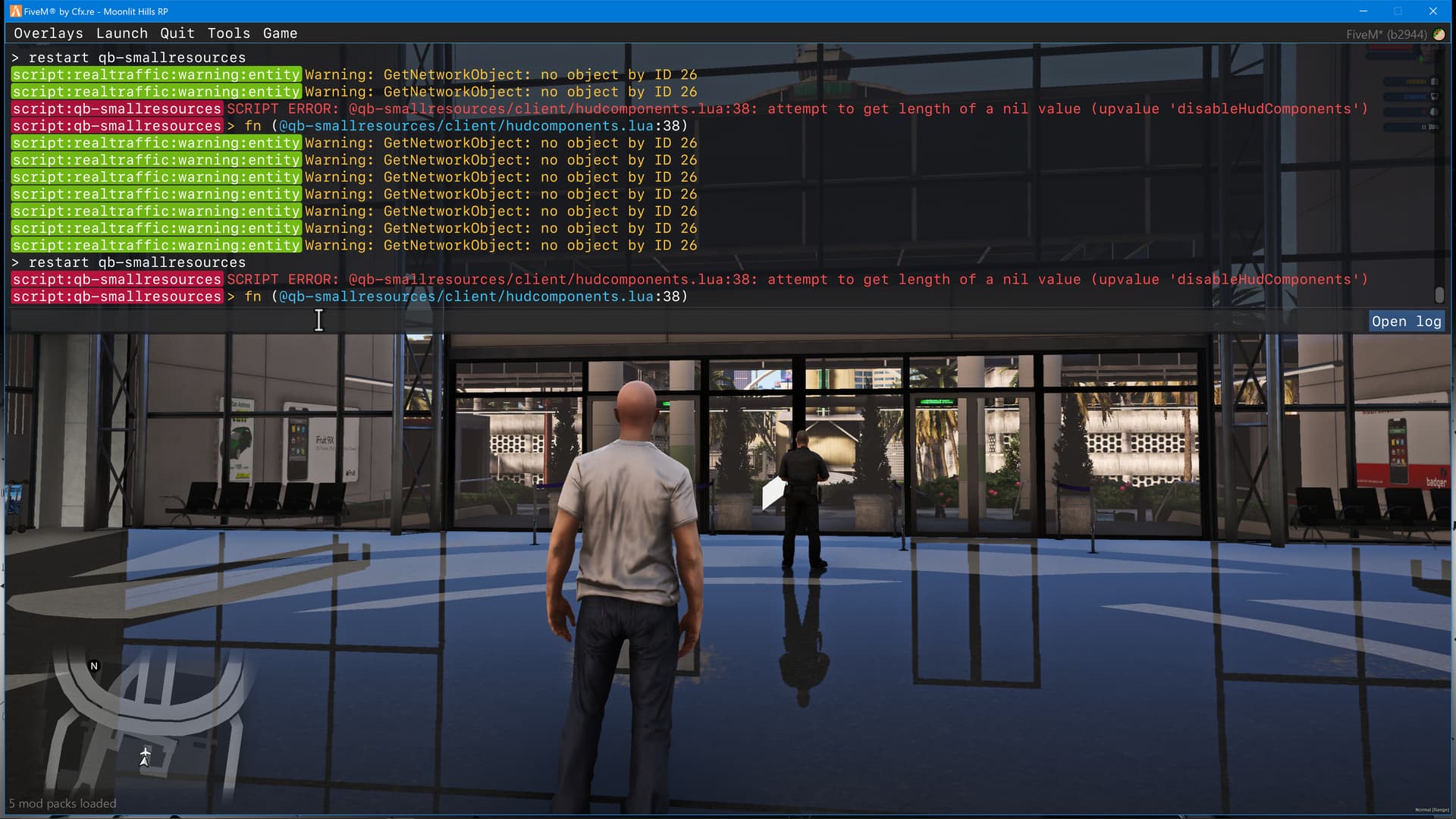
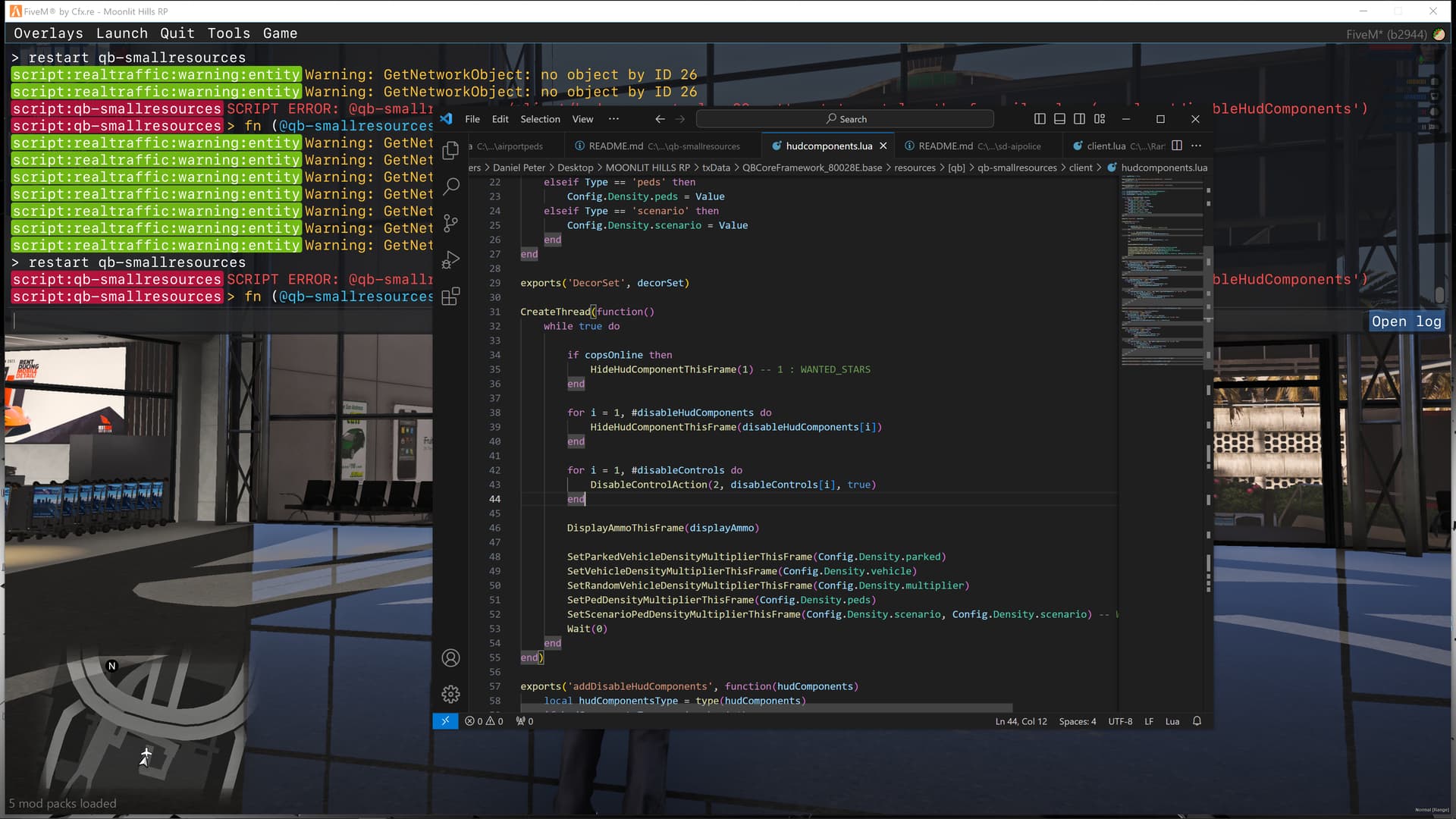
however if I remove the line it will show it starts without errors… hmm…
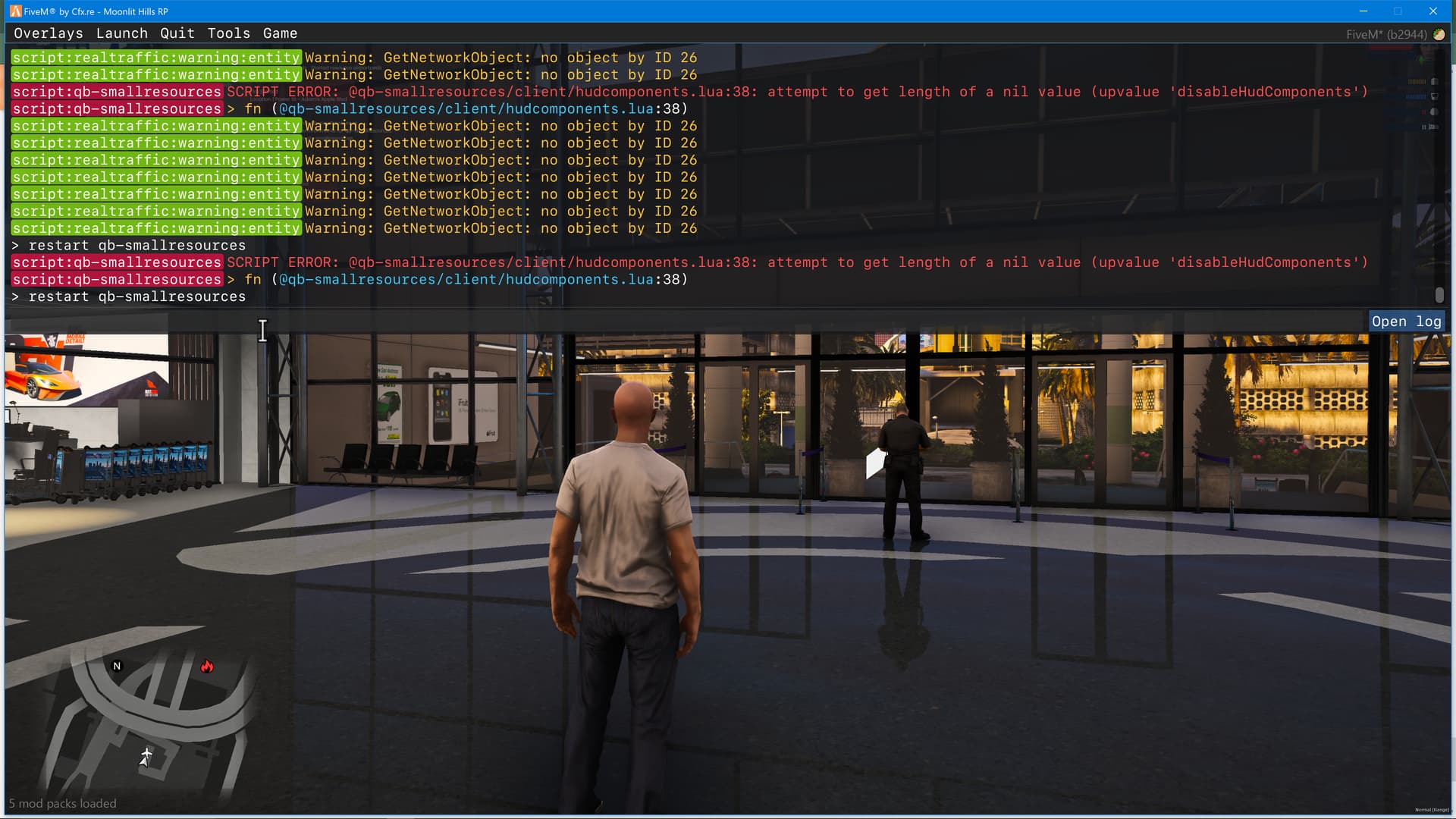
@SamuelBlack Hi, how are you? I’ve started to take your code and put it on ESX if you don’t mind.
2 Likes
How is that going?
Hi, I’ve put it on pause for the moment because I have other projects that I’m updating but I’ll get back to it soon.
2 Likes
Hi, were you able to convert it to esx?
lo esperare :,v
i did everything it said but its not working.there was a issue .i counld find a certain code which u mentioned so idk what to change in that aspect
works perfectly. updated it to work with the latest version of qb-smallresources. ty!
I’m about to do the same. Would you be willing to be an awesome member of the community and share so I can save time?  RIP Trevor
1 Like
Got you bro…
Installation
1.) First you want to go to qb-smallresources/config.lua and find the following:
lua
Config.BlacklistedPeds = {
    [`s_m_y_ranger_01`] = true,
    [`s_m_y_sheriff_01`] = true,
    [`s_m_y_cop_01`] = true,
    [`s_f_y_sheriff_01`] = true,
    [`s_f_y_cop_01`] = true,
    [`s_m_y_hwaycop_01`] = true,
}
You can either remove these entries entirely or set them all to false to look like this:
lua
Config.BlacklistedPeds = {
    [`s_m_y_ranger_01`] = false,
    [`s_m_y_sheriff_01`] = false,
    [`s_m_y_cop_01`] = false,
    [`s_f_y_sheriff_01`] = false,
    [`s_f_y_cop_01`] = false,
    [`s_m_y_hwaycop_01`] = false,
}
2.) Go to qb-smallresources/client/ignore.lua and find the following section:
lua
CreateThread(function()
    for i = 1, 15 do
        local toggle = Config.AIResponse.dispatchServices[i]
        EnableDispatchService(i, toggle)
    end

    local wantedLevel = Config.AIResponse.wantedLevels and 5 or 0
    SetMaxWantedLevel(wantedLevel)
end)
You’ll want to comment out the entire code block, by using --[[ code ]]-- like this:
lua
--[[
CreateThread(function()
    for i = 1, 15 do
        local toggle = Config.AIResponse.dispatchServices[i]
        EnableDispatchService(i, toggle)
    end

    local wantedLevel = Config.AIResponse.wantedLevels and 5 or 0
    SetMaxWantedLevel(wantedLevel)
end)
]]--
3.) In the same file (ignore.lua), find this section:
lua
CreateThread(function() -- all these should only need to be called once
    if Config.Disable.ambience then
        StartAudioScene('CHARACTER_CHANGE_IN_SKY_SCENE')
        SetAudioFlag('DisableFlightMusic', true)
    end
    SetAudioFlag('PoliceScannerDisabled', true)
    SetGarbageTrucks(false)
    SetCreateRandomCops(false)
    SetCreateRandomCopsNotOnScenarios(false)
    SetCreateRandomCopsOnScenarios(false)
    DistantCopCarSirens(false)
    RemoveVehiclesFromGeneratorsInArea(335.2616 - 300.0, -1432.455 - 300.0, 46.51 - 300.0, 335.2616 + 300.0, -1432.455 + 300.0, 46.51 + 300.0) -- central los santos medical center
    RemoveVehiclesFromGeneratorsInArea(441.8465 - 500.0, -987.99 - 500.0, 30.68 - 500.0, 441.8465 + 500.0, -987.99 + 500.0, 30.68 + 500.0)     -- police station mission row
    RemoveVehiclesFromGeneratorsInArea(316.79 - 300.0, -592.36 - 300.0, 43.28 - 300.0, 316.79 + 300.0, -592.36 + 300.0, 43.28 + 300.0)         -- pillbox
    RemoveVehiclesFromGeneratorsInArea(-2150.44 - 500.0, 3075.99 - 500.0, 32.8 - 500.0, -2150.44 + 500.0, -3075.99 + 500.0, 32.8 + 500.0)      -- military
    RemoveVehiclesFromGeneratorsInArea(-1108.35 - 300.0, 4920.64 - 300.0, 217.2 - 300.0, -1108.35 + 300.0, 4920.64 + 300.0, 217.2 + 300.0)     -- nudist
    RemoveVehiclesFromGeneratorsInArea(-458.24 - 300.0, 6019.81 - 300.0, 31.34 - 300.0, -458.24 + 300.0, 6019.81 + 300.0, 31.34 + 300.0)       -- police station paleto
    RemoveVehiclesFromGeneratorsInArea(1854.82 - 300.0, 3679.4 - 300.0, 33.82 - 300.0, 1854.82 + 300.0, 3679.4 + 300.0, 33.82 + 300.0)         -- police station sandy
    RemoveVehiclesFromGeneratorsInArea(-724.46 - 300.0, -1444.03 - 300.0, 5.0 - 300.0, -724.46 + 300.0, -1444.03 + 300.0, 5.0 + 300.0)         -- REMOVE CHOPPERS WOW
end)
You are going to want to comment out everything below the ambience block, so it looks like this:
lua
CreateThread(function() -- all these should only need to be called once
    if Config.Disable.ambience then
        StartAudioScene('CHARACTER_CHANGE_IN_SKY_SCENE')
        SetAudioFlag('DisableFlightMusic', true)
    end
    --[[
    SetAudioFlag('PoliceScannerDisabled', true)
    SetGarbageTrucks(false)
    SetCreateRandomCops(false)
    SetCreateRandomCopsNotOnScenarios(false)
    SetCreateRandomCopsOnScenarios(false)
    DistantCopCarSirens(false)
    RemoveVehiclesFromGeneratorsInArea(335.2616 - 300.0, -1432.455 - 300.0, 46.51 - 300.0, 335.2616 + 300.0, -1432.455 + 300.0, 46.51 + 300.0) -- central los santos medical center
    RemoveVehiclesFromGeneratorsInArea(441.8465 - 500.0, -987.99 - 500.0, 30.68 - 500.0, 441.8465 + 500.0, -987.99 + 500.0, 30.68 + 500.0)     -- police station mission row
    RemoveVehiclesFromGeneratorsInArea(316.79 - 300.0, -592.36 - 300.0, 43.28 - 300.0, 316.79 + 300.0, -592.36 + 300.0, 43.28 + 300.0)         -- pillbox
    RemoveVehiclesFromGeneratorsInArea(-2150.44 - 500.0, 3075.99 - 500.0, 32.8 - 500.0, -2150.44 + 500.0, -3075.99 + 500.0, 32.8 + 500.0)      -- military
    RemoveVehiclesFromGeneratorsInArea(-1108.35 - 300.0, 4920.64 - 300.0, 217.2 - 300.0, -1108.35 + 300.0, 4920.64 + 300.0, 217.2 + 300.0)     -- nudist
    RemoveVehiclesFromGeneratorsInArea(-458.24 - 300.0, 6019.81 - 300.0, 31.34 - 300.0, -458.24 + 300.0, 6019.81 + 300.0, 31.34 + 300.0)       -- police station paleto
    RemoveVehiclesFromGeneratorsInArea(1854.82 - 300.0, 3679.4 - 300.0, 33.82 - 300.0, 1854.82 + 300.0, 3679.4 + 300.0, 33.82 + 300.0)         -- police station sandy
    RemoveVehiclesFromGeneratorsInArea(-724.46 - 300.0, -1444.03 - 300.0, 5.0 - 300.0, -724.46 + 300.0, -1444.03 + 300.0, 5.0 + 300.0)         -- REMOVE CHOPPERS WOW
    ]]--
end)
4.) Head back over to the qb-smallresources/config.lua and find the following:
lua
Config.Disable = {
    hudComponents = {1, 2, 3, 4, 7, 9, 13, 14, 19, 20, 21, 22}, -- Hud Components: https://docs.fivem.net/natives/?_0x6806C51AD12B83B8
    controls = {37}, -- Controls: https://docs.fivem.net/docs/game-references/controls/
    displayAmmo = true, -- false disables ammo display
    -- ... other config options
}
We are going to want to remove the ‘1’ from hudComponents, so it should look like this:
lua
hudComponents = {2, 3, 4, 7, 9, 13, 14, 19, 20, 21, 22},
5.) Now you’re going to want to go to qb-smallresources/client/hudcomponents.lua and add the following to the top of the file:
lua
local copsOnline = false

RegisterNetEvent('qb-smallresources:client:CopsOnline', function()
	copsOnline = true
end)

RegisterNetEvent('qb-smallresources:client:CopsOffline', function()
	copsOnline = false
end)
6.) Finally, you’re going to want to scroll down in the same file (hudcomponents.lua) and find this CreateThread:
lua
CreateThread(function()
    while true do

        for i = 1, #disableHudComponents do
            HideHudComponentThisFrame(disableHudComponents[i])
        end

        for i = 1, #disableControls do
            DisableControlAction(2, disableControls[i], true)
        end

        DisplayAmmoThisFrame(displayAmmo)

        SetParkedVehicleDensityMultiplierThisFrame(Config.Density.parked)
        SetVehicleDensityMultiplierThisFrame(Config.Density.vehicle)
        SetRandomVehicleDensityMultiplierThisFrame(Config.Density.multiplier)
        SetPedDensityMultiplierThisFrame(Config.Density.peds)
        SetScenarioPedDensityMultiplierThisFrame(Config.Density.scenario, Config.Density.scenario) -- Walking NPC Density
        Wait(0)
    end
end)
You need to add the wanted stars hiding logic after the disableHudComponents loop. The final result should look like this:
lua
CreateThread(function()
    while true do

        for i = 1, #disableHudComponents do
            HideHudComponentThisFrame(disableHudComponents[i])
        end

        -- Hide wanted stars when player cops are online
        if copsOnline then
            HideHudComponentThisFrame(1) -- 1 : WANTED_STARS
        end

        for i = 1, #disableControls do
            DisableControlAction(2, disableControls[i], true)
        end

        DisplayAmmoThisFrame(displayAmmo)

        SetParkedVehicleDensityMultiplierThisFrame(Config.Density.parked)
        SetVehicleDensityMultiplierThisFrame(Config.Density.vehicle)
        SetRandomVehicleDensityMultiplierThisFrame(Config.Density.multiplier)
        SetPedDensityMultiplierThisFrame(Config.Density.peds)
        SetScenarioPedDensityMultiplierThisFrame(Config.Density.scenario, Config.Density.scenario) -- Walking NPC Density
        Wait(0)
    end
end)
Now you’re done and ready to run from some cops!
1 Like
My homie!