Most metal detector scripts play the same way: walk around until the beeping
gets faster, hold E, watch a progress bar, get a random item. I wanted the
detector itself to be the game. This one reads like a real detector, with a
target number, a tone and a depth, and you decide whether a signal is worth
digging. Then you dig the find out and clean it in two minigames written from
scratch inside the resource. No ox_lib, no ps-ui, nothing to install alongside
it.
It’s free, and it’s escrowed on the Lua side only. Config, locales and the whole
UI (plain html/css/js) stay open, so you can tune it for your server and restyle
it if you want to.
Preview



How a job runs
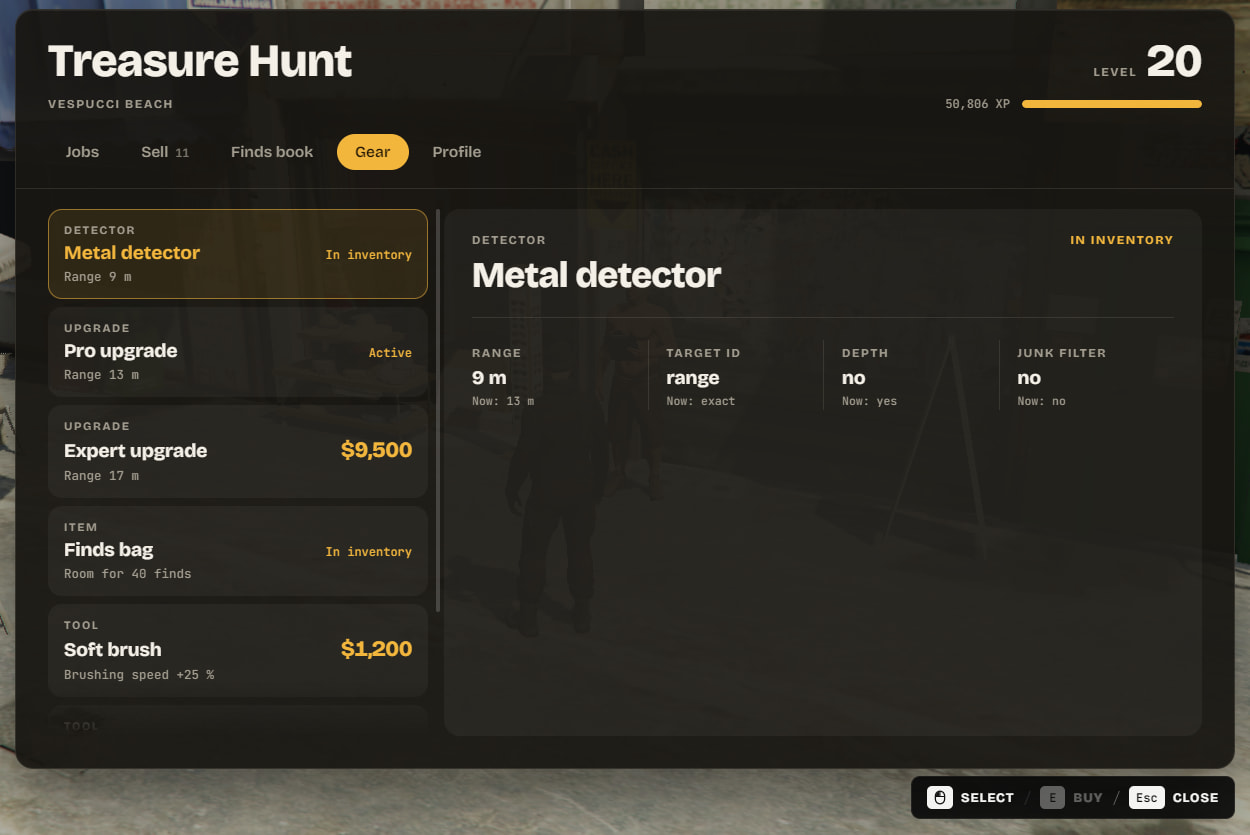
A dealer at Vespucci Beach sells you a metal detector and offers three jobs.
Each one names the terrain, the zone, what you have to find and what it pays.
Accept one, follow the route and take the detector out with G.
The detector only picks up signals inside the job zone, which keeps the beaches
free for everyone else and the economy in check. Leave the zone after your first
visit and a countdown starts. Stay away for three minutes and the job ends, so
nobody has to drive back just to cancel. Running jobs are saved and survive a
relog and a server restart.
Reach the goal, walk back, hand it in. The pay grows with your level and with a
streak of jobs in a row.
Reading the signal
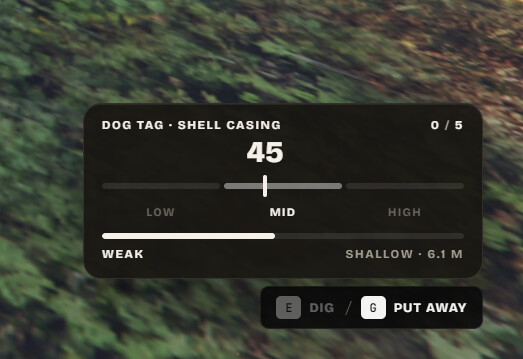
The HUD sits at the bottom right and works like the display of a real detector:
a scale with three tone zones (low, mid, high), a needle, and the target number
from 0 to 99.
Every find has its own number range and depth. A gold ring reads in the 40s and
50s, old coins in the 80s. Junk sits right in between: a pull tab reads almost
like a gold ring, and a bottle cap gives a choppy signal that jumps around.
Learning those numbers is the skill.
The finds book helps you with that. Once you’ve found something, the HUD
names the finds from your book that match the signal under your feet. The more
you’ve found, the better you know what you’re standing on.
The detector you buy shows a range. The pro upgrade shows the exact number and
the depth, the expert upgrade filters out the low junk numbers. Each step also
reaches further.
Digging and cleaning
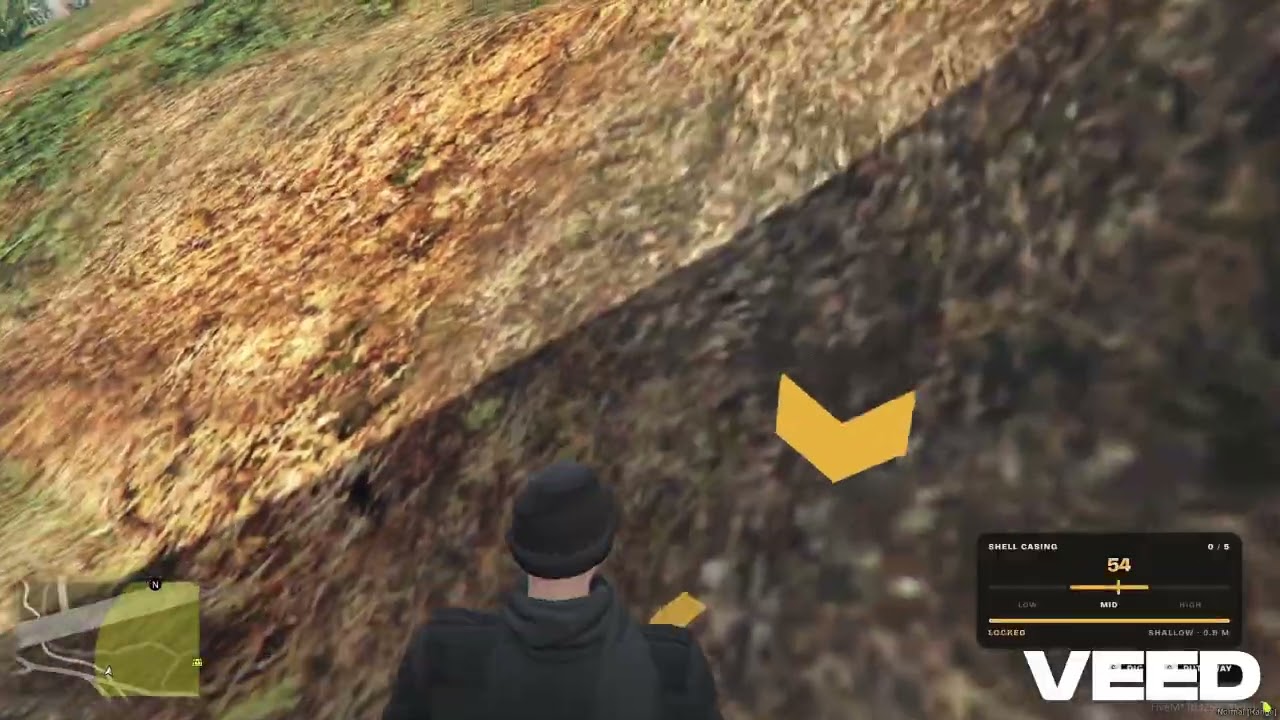
When you lock onto a signal, a ring and an arrow mark the spot. Press E, your
character kneels down and the dig starts.
- Relaxed (default) – a 5×5 patch of ground with two layers, the find sits
under the mark. Shovel the dirt away and switch to the brush once something
glints. Go at a glint with the shovel and you scratch the find. - Challenging – 7×7, three layers, a limited number of moves, and the find
can be anywhere. Spade, trowel, brush and a pinpointer that tells you how
close you are. - Off – just the dig time, no minigame.
The mode is set per job type, so your beach can stay relaxed while the mountains
get hard.
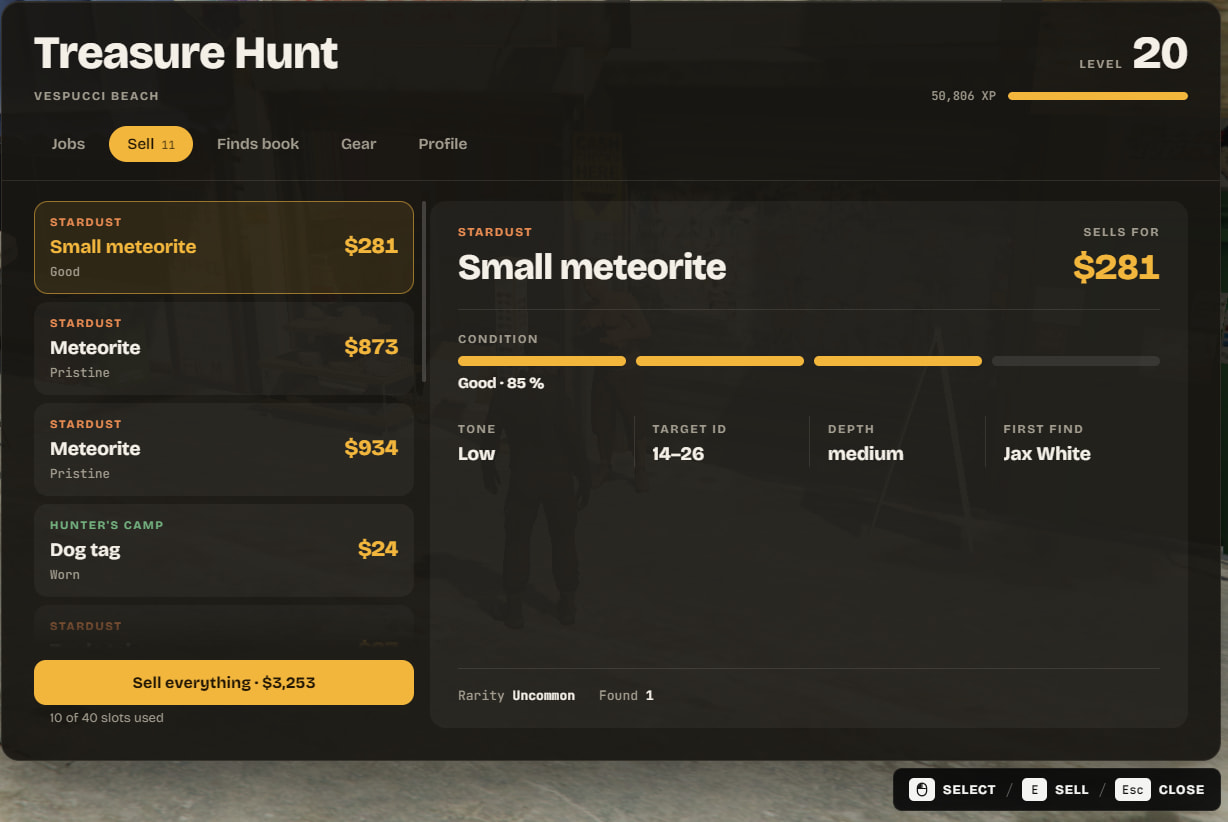
After digging you clean the find: brush the dirt off with your mouse. Brush too
fast and you leave scratches. Every find has a condition from pristine down to
fragment, and the price depends on the find and its condition. Skip the cleaning
and it sells for less.
Finds book and sets
62 entries across five terrains: 41 finds in five rarities, plus the junk.
They’re grouped into ten sets, one for the finds and one for the junk of every
terrain. Completing a set pays money and XP, and three of them give a title.
The first player on the server to dig up each find is remembered by name and
shown in the book and on the find card. There’s no server-wide announcement,
just the entry.
The profile has three leaderboards: most valuable find, most finds, most first
finds.
Treasure maps
Junk isn’t worthless. Every piece you dig up has a small chance (8% by default)
to hide a piece of a treasure map. Four pieces make a map, and the map is an
item.
Use the map and it marks a search circle in a zone you’ve already unlocked.
Somewhere inside, the detector picks up one strong signal. Dig it out and a
chest rises out of the ground and opens: cash, three good finds from that
terrain and bonus XP. Not in the mood right now? Put the map away at the dealer
and use it later.
Other scripts can hand out the map item too, so it also works as a reward for
your own events.
Progression
20 levels. Every level adds 3% to the job pay and slightly better odds for rare
finds, and new terrains open up along the way:
| Level | Unlocks |
|---|---|
| 1 | Beach, finds bag |
| 3 | Lost wedding ring (one specific ring among a lot of junk), soft brush |
| 5 | Fields, pro detector upgrade |
| 10 | Forest, pro shovel |
| 12 | Expert detector upgrade |
| 15 | Desert |
| 20 | Mountains, they need a pickaxe |
Items
- The metal detector is an item you buy at the dealer. The upgrades stay
with the character, so a lost detector doesn’t cost you the pro version. - The finds bag holds up to 40 finds that weigh nothing. Without a bag,
finds go straight into the inventory. - Every find becomes a real item when it leaves the bag (
th_gold_ringand
so on). On ox_inventory and qb-inventory the condition stays on the item, so
players can trade finds and the dealer still pays the right price. - Want finds to feed into your own economy? Point any find at an item your
server already has, gold bars for example. - A pickaxe your server already has works for the mountains, no second one
needed.
The detector in your hand
GTA has no long metal detector, so the resource ships its own 3D model. It’s a
prop in the hand, not a weapon, so it never fights with the weapon checks of
your inventory or anticheat. It swings left and right while you search.
How it sits in the hand depends on the animation, so there’s an admin menu for
it: /thprop. Change position, hand and holding animation live with the arrow
keys, press Enter and it’s written into config.lua and sent to every player.
Interface
Dealer menu, HUD, minigames and find cards share one look: a clean grotesque
font, one accent colour (gold by default, any hex value in the config) and a key
hint bar under every window that tells you what you can press. Fonts and images
ship with the resource, nothing loads from the internet.
Configuration
Everything is in one config.lua, in English, with comments that say what each
value does: zones as circles, the ground materials finds can lie on, every find
with its number range, depth, rarity and value, sets and rewards, rarities,
levels, prices, the dig mode per job type, and the accent colour of the UI.
/thcoords prints your position, a finished zone line and the ground material
under you, so adding your own zones takes a minute.
Other bits
- Runs on ESX, QBCore and Qbox from the same folder, the framework is
detected on startup - ox_inventory, qb-inventory or the ESX inventory. Items register themselves
on ESX and QBCore, for ox_inventory the console prints the exact lines to
paste - Interaction through ox_target, qb-target or the E key, detected
automatically - Six languages included: English, German, Spanish, Polish, Portuguese (BR)
and Turkish, switched with one config value - Database tables create themselves, no SQL to import
- Server authoritative – find spots and loot are rolled on the server, a
signal never tells the client what lies under it, and every dig and every
cleaning is checked against the clock - 0.00 ms in
resmonwith the detector put away, up to 0.07 ms while searching
Download
https://www.jaxwscripts.store/
Support and bug reports: JaxWScripts
| Code is accessible | Partly – config, locales and the html UI are open, the Lua is escrowed |
| Subscription-based | No |
| Lines (approximately) | ~7200 |
| Requirements | es_extended, qb-core or qbx_core, oxmysql, an inventory, ox_target/qb-target optional |
| Support | Yes |
