What is the issue you’re having?
Hello,
I’m having an issue with FiveM. It crashes when starting and I cannot get it to launch.
My GTA V Legacy works perfectly when launched through both Steam and Rockstar Games Launcher. Rockstar Games Launcher also works normally and I’m logged in automatically.
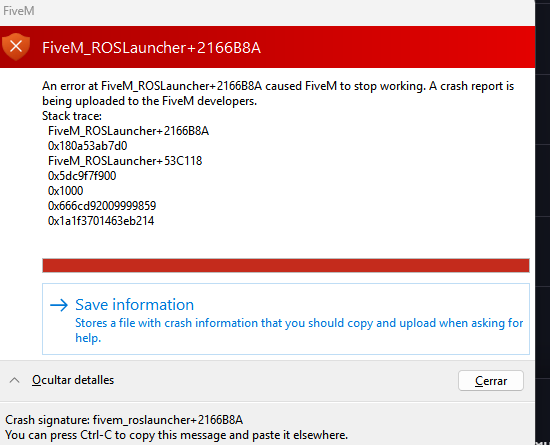
However, FiveM crashes with this error:
FiveM_ROSLauncher+2166B8A
The crash report also contains this message:
Could not do OpenProcess on parent process.
Before this crash, I was getting:
506. Failure connecting to the Rockstar Games Launcher! (ExitCode = 506)
Things I’ve already tried:
- Reinstalled FiveM.
- Reinstalled Rockstar Games Launcher.
- Installed Microsoft Visual C++ Redistributables 2015–2022 (x64 and x86).
- Checked Windows Firewall rules.
- Checked that Rockstar Game Library Service is running.
- Renamed the DigitalEntitlements folder to regenerate the authentication files.
- Confirmed GTA V works normally through Steam and Rockstar Launcher.
The problem only happens when launching FiveM.
My system:
- Windows 11
- AMD Ryzen 5 7600
- AMD Radeon RX 7600
- 16 GB RAM
- GTA V Legacy (Steam)
I’ve attached the FiveM crash report ZIP.
Could you please help me identify what is causing the ROSLauncher crash?
Thank you.
Error screenshot(s)
Windows version
Windows 25H2
System specifications
Windows 11
AMD Ryzen 5 7600
AMD Radeon RX 7600
16 GB RAM
GTA V Legacy (Steam)
Antivirus software
Microsoft Defender Antivirus